
Like a template repository, which can be used to import into different accounts in the company.
Add template:
- Only the admin account has permission to use this function.
- This function allows Admin to add new templates to the Template Library.
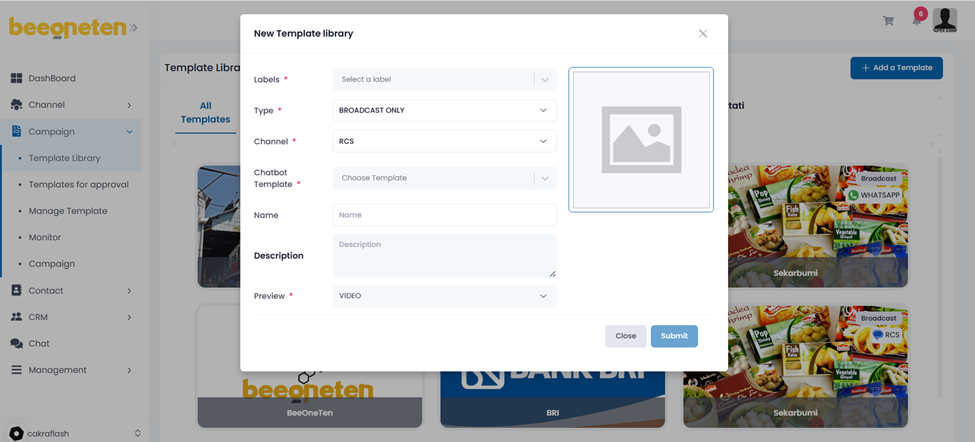
- Step by step:
- Click Add template button
- Select Labels (aka Category): these categories are used to distinguish templates for different industries
- Select Type of template : Broadcast only or Conversation
- Select Channel: RCS – VIBER – Zalo…
- Select Template: these templates are added or created by Admin
- Input name: named your template
- Input Description: describe your template
- Input Background url: use to represent the template
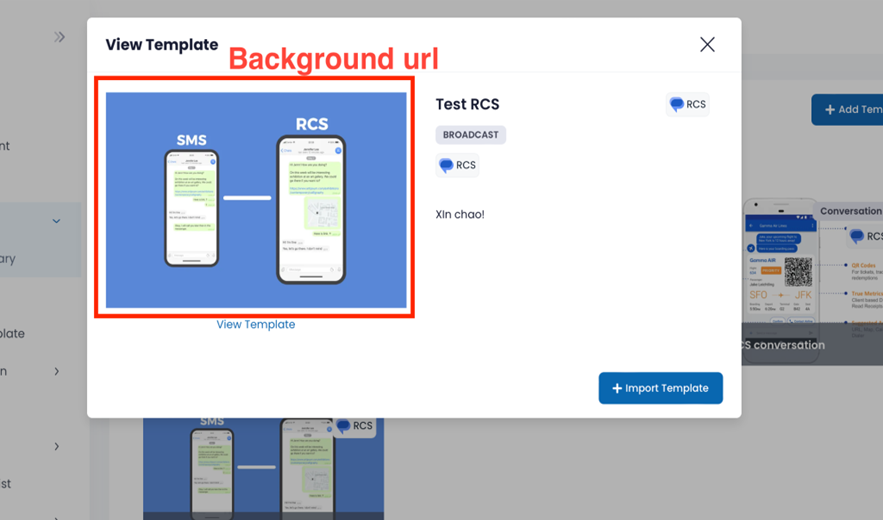
Select Type as image or video: which would be displayed when the user clicks on the background url
Import template:
- The functionality can be used by authorized accounts in the template section.
- Step by step:
- Click on the template you would like to add to your template
- Click on Import template button
- Edit Name, Type of Channel => click Confirm button
- Check your newly added template in your Manage template section
